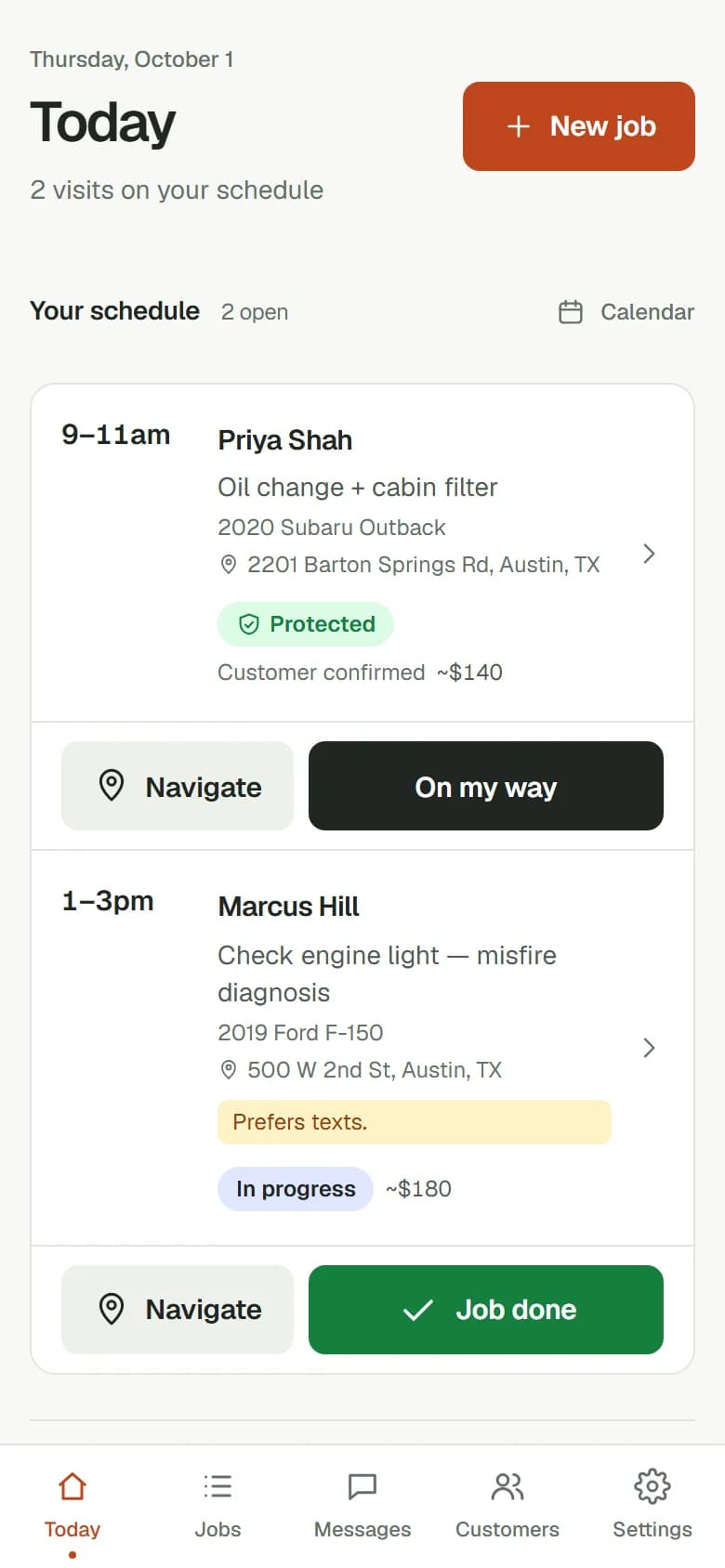
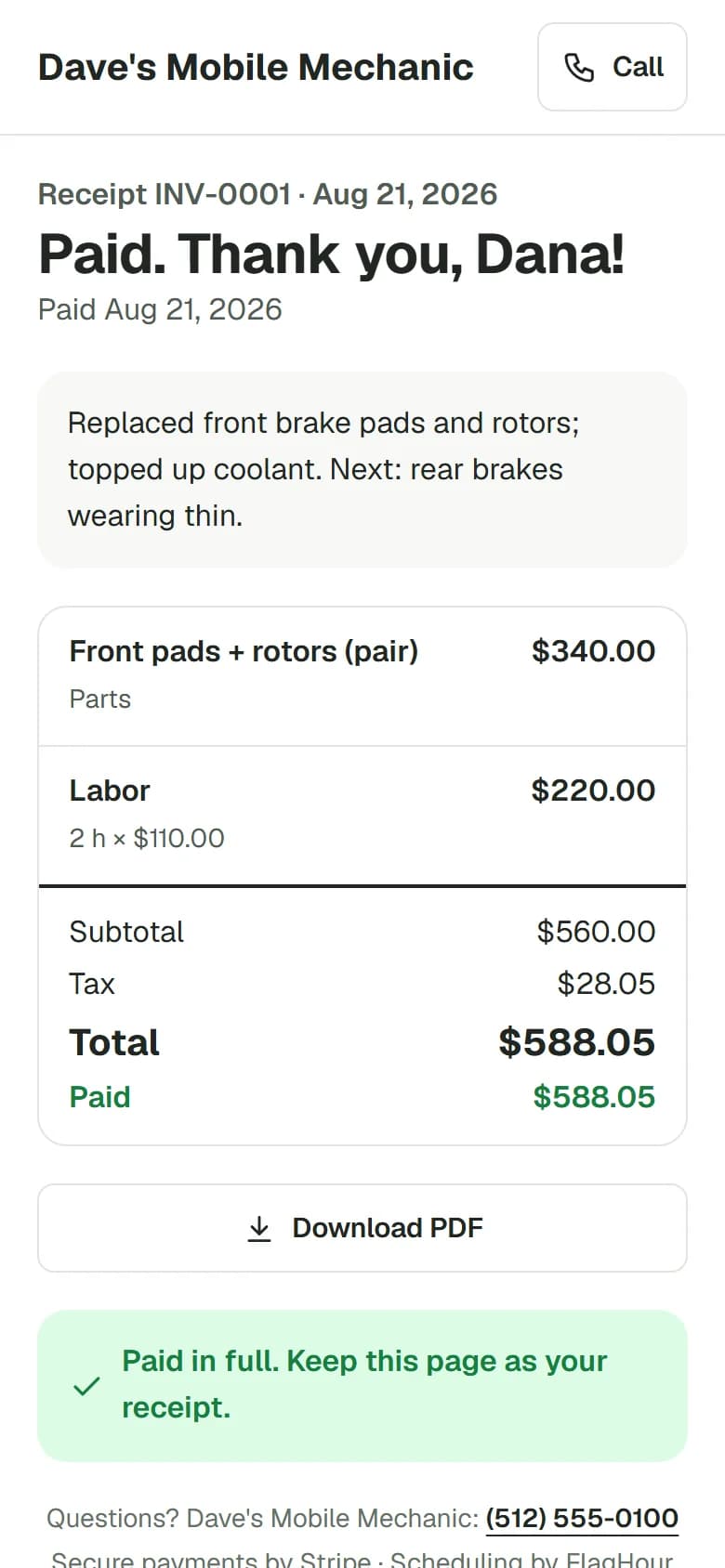
Your customer confirms the visit with a card hold before you leave. If they’re a no-show, your fee comes out of that hold. Then text, invoice and get paid from the same app.
No card needed to try it. $19C$25.99/month after. No cut of your job payments.
No-show protectionA hold, not a charge.Before you drive$50 held on their cardIf they no-showYou charge the $50 fee
Your dayEvery job. One screen.
After the jobPaid in full. Receipt sent.
Swipe for more →
A hold, not a charge Customers don’t need an app Payments go to your own Stripe account
Before you drive out
How the hold works.
1You send a link before you head out.
2Your customer confirms with Apple Pay, Google Pay or a card. No download, no account.
3The hold sits on their card. Nothing is charged yet.
4Job done: charge the card and the hold counts toward the bill, or take Zelle, cash or check and the hold is released.
5No-show: charge your fee from the hold, or release it. Your call.
The hold covers the amount you set, not the whole bill. Banks drop an unused hold after about 7 days, so FlagHour warns you when a job is further out and emails you before a hold runs out.
“Hi Dana, confirming Tuesday 9–11am for your front brakes. Secure your visit with a temporary $50 card hold using the link below.”
A hold, not a charge.
The customer sees your hold and cancellation terms before confirming.
Card details are entered on Stripe’s secure form.
Card payments, texts and email run on Stripe, Twilio and Resend, AI invoice drafts on OpenAI, and our domain on Cloudflare. Card numbers go straight to Stripe, never to FlagHour.
Twilio
Cloudflare
In Basic · $19C$25.99 a month
The rest of the job, handled.
With 400 customer texts and 200 AI invoice drafts a month. The free trial includes 200 texts and 40 drafts.
Talking to customers
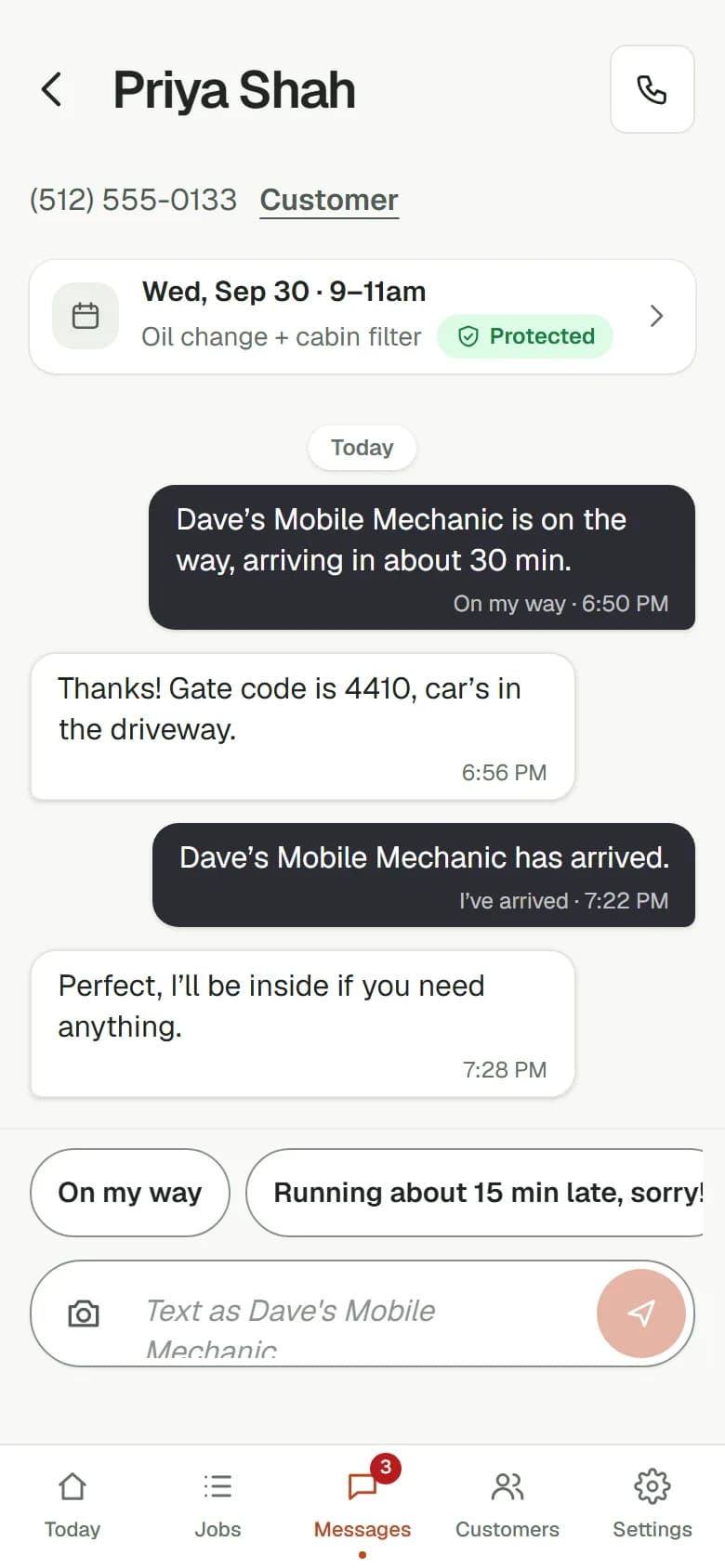
Every customer text in one inbox
Customers reply to your texts and it lands next to their job. Reply in a tap, photos included; your phone buzzes.
“On my way”, “I’ve arrived” and “Job done” texts
One tap each, with an ETA. The customer knows when you’re coming.
Payment reminders that stop when they pay
Friendly texts 3, 7 and 14 days after the due date. Never to someone who paid.
Running the job
Your week on a calendar
Every job as a block by the hour. Double-booked? It tells you before you save.
Canned jobs
Brake pads, battery, oil change: your prices, one tap onto the estimate.
Before / during / after photos
On every receipt. Your proof if a charge is ever disputed.
Records and money
Know what you made
Money in, money owed, no-show fees kept, and your profit on each job once you add parts costs.
Every car’s service history
Work, parts, odometer and price for each visit, searchable.
Mileage log and VIN scan
Trips logged for tax time. Point the camera at the VIN instead of typing it.
Premium ($39C$53.99/month) adds online booking, service reminders and “Repeat last service”, Google review requests, team logins, business trends and advanced reports with CSV export.
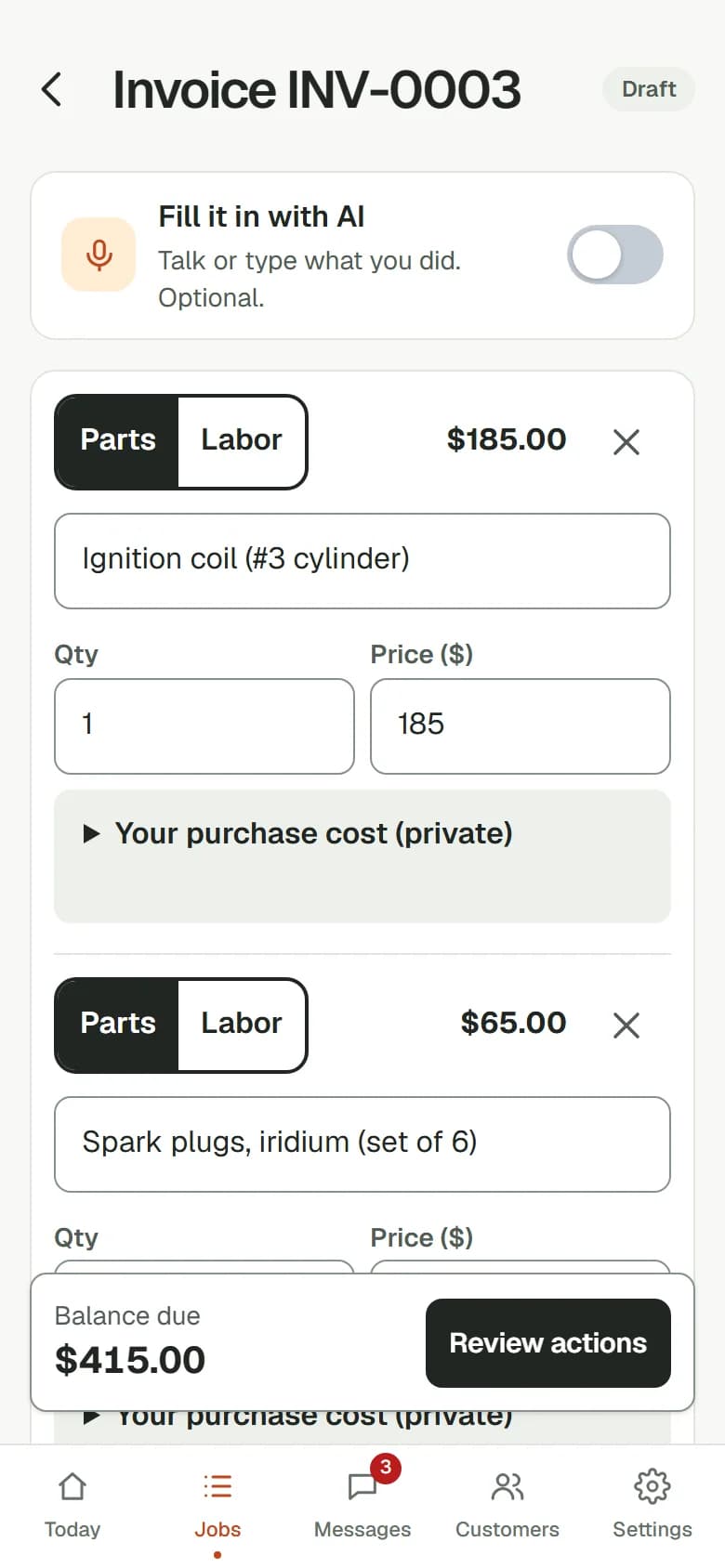
Talk or type the job, like “front pads and rotors on the Civic, $340 parts, two hours labor.” Parts and labor are split out and your rate is filled in. Check it, then charge it.
Optional. You can always build an invoice by hand.
Texts go out as your business, and replies land next to the job. “On my way” and “I’ve arrived” are one tap each, so your customer always knows when you’re coming.
Reply in a tap. Your phone buzzes when they write back.
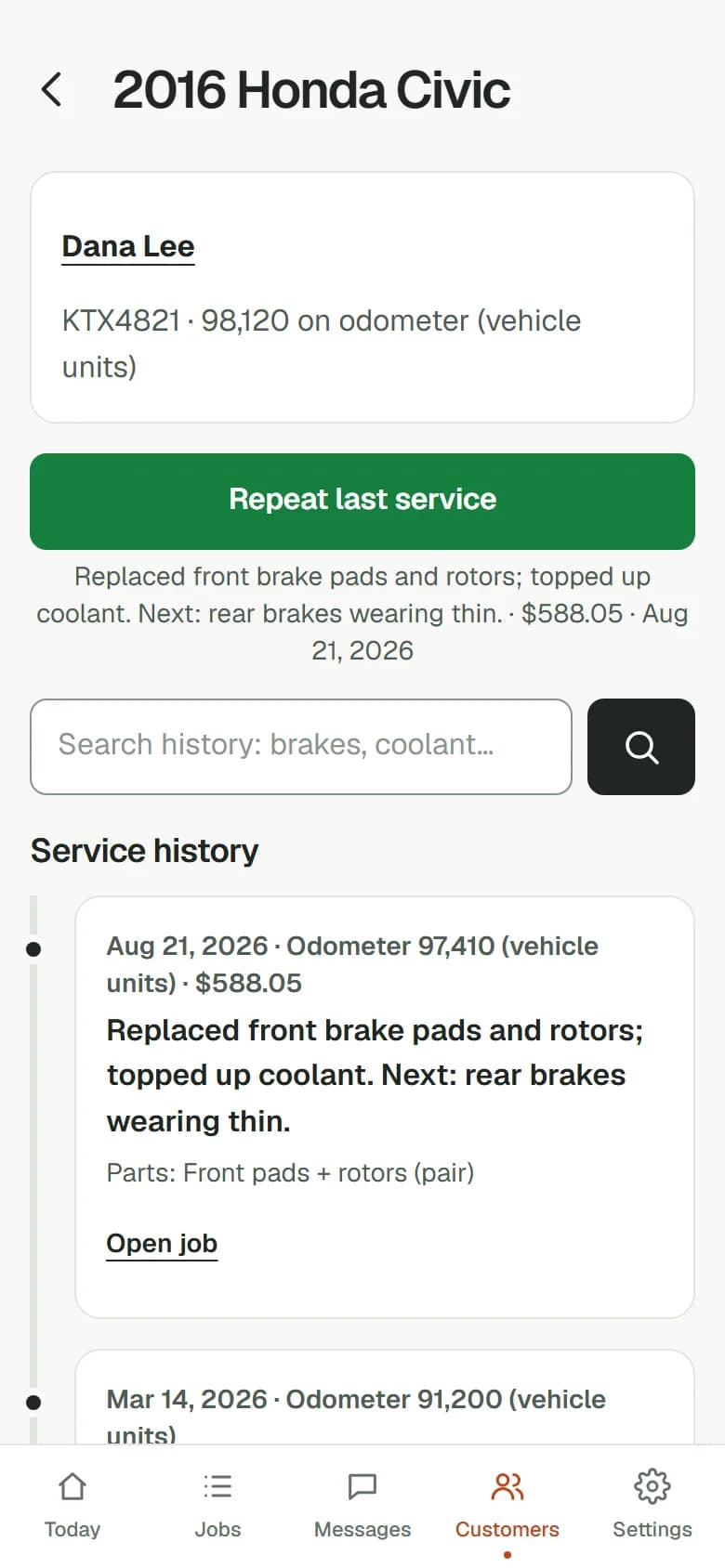
Each vehicle keeps a timeline of every job, with the work, parts, odometer and price. Search it in seconds. On Premium, repeat the last service in a few taps.
Your service history stays with you, and exports any time.
The hold. When you tap Protect this job, we text your customer a link to put a temporary hold on their card ($50 unless you change it). A hold isn’t a charge: it temporarily reserves available funds until it is released or the bank’s authorization expires.
Job done, or a no-show. Job done? Choose to charge the card or mark the bill paid via Zelle, cash or check. For a card payment, check the exact amounts and confirm: the hold goes toward the bill and the rest is charged to the same card; if the bank declines the rest, your customer gets a pay link. For an outside payment, the unused card hold is released immediately; your bank may take time to update. Customer a no-show? One screen charges your no-show fee from the hold, or releases it.
Where the money goes. Card payments go straight into your own Stripe account, in US or Canadian dollars depending on where you work. Zelle, cash and check payments stay with you. FlagHour never holds your money and takes no cut of job payments, no-show fees or late-cancel fees. You pay us $19/monthC$25.99/month for the app; Stripe keeps its standard processing fee only when a card is charged. Stripe then sends your balance to your bank on your payout schedule, usually a couple of business days after each charge (a brand-new Stripe account often waits 7–14 days for its first payout).
Refunds and disputes. Refunds and disputes are handled in your Stripe dashboard, and FlagHour shows them on the job.
Can customers pay another way?+
Yes. Once you receive payment by Zelle, cash or check, mark the invoice paid in FlagHour. The unused card hold is released without charging the card. Your customer’s bank may take time to show the release.
Is my customers’ card information safe?+
Your customer types their card into Stripe’s secure form. The card number goes to Stripe, never to you and never to FlagHour. You see the card brand and last 4 digits.
What if a customer wants a refund?+
You refund them from your Stripe dashboard, straight back to their card, and FlagHour shows it on the job.
Can I leave?+
Any time, in Settings. Download all your jobs, invoices, customers and service history as spreadsheets first.
Do the math
A wasted visit can cost more than a month.
A wasted drive and an empty slot, against $19C$25.99 a month. Put in your own numbers.
One no-show you can’t refill
$225
of time you can’t bill, before fuel. That’s 11.8 months of FlagHour at $19.00.